2 posts tagged with "upgrade"

View All Tags

· 4 min read
Samuel Vasconcelos

Harvester v1.7.0 introduced the kubevirt-migration setting, which exposes the cluster-wide live migration configuration that previously could only be changed by editing the kubevirt object directly.

If you customized spec.configuration.migrations on the kubevirt object before upgrading, that customization is at risk. This article explains why and provides a script that converts it into the setting so it is preserved.

Who is affected

You are affected if both of the following are true:

  • You are running a version earlier than v1.7.0 and you changed spec.configuration.migrations on the kubevirt object, for example to enable allowAutoConverge.
  • You plan to upgrade to v1.7.0 or later.

You are also affected if you have already upgraded to v1.7.x and have not yet changed the kubevirt-migration setting. In that case the configuration is still intact and the same script applies.

Check whether the kubevirt object carries a configuration:

kubectl get kubevirt kubevirt -n harvester-system -o jsonpath='{.spec.configuration.migrations}' | jq

If the command returns nothing, your cluster uses the KubeVirt defaults and no action is required.

What happens without this procedure

The upgrade creates the kubevirt-migration setting without a value, so the Harvester UI displays the default values. The kubevirt object keeps your configuration, so live migration continues to behave as before.

The two are now inconsistent, and the inconsistency is not visible unless you compare them. Harvester writes the whole value of the setting to the kubevirt object, so the first time the setting is saved, all fields are written at once, including the fields that you did not change. Your configuration is replaced by the defaults, without warning.

In practice this means that changing an unrelated field such as parallelMigrationsPerCluster in the UI silently turns allowAutoConverge back off. Migrations of write-heavy virtual machines then start failing to converge, which is often noticed only during the node drains of a later upgrade.

Procedure

Run the following script from a machine with kubectl access to the cluster. jq is required.

Run it before you upgrade to v1.7.0 or later. If you already upgraded to v1.7.x and have not yet changed the setting, run it now.

#!/bin/bash
set -euo pipefail

SETTING_NAME="kubevirt-migration"

migrations=$(kubectl get kubevirt kubevirt -n harvester-system -o json | jq -c '.spec.configuration.migrations // empty')
if [ -z "$migrations" ]; then
echo "The kubevirt object has no migration configuration. Nothing to preserve."
exit 0
fi

# nodeDrainTaintKey and network cannot be configured through the setting:
# nodeDrainTaintKey is used by the upgrade process, and network is owned by
# the vm-migration-network setting. The webhook rejects a value containing them.
value=$(echo "$migrations" | jq -c 'del(.nodeDrainTaintKey, .network)')
if [ "$value" = "{}" ]; then
echo "The migration configuration only contains fields that the setting does not manage. Nothing to preserve."
exit 0
fi

if setting_json=$(kubectl get settings.harvesterhci.io "$SETTING_NAME" -o json 2>/dev/null); then
current_value=$(echo "$setting_json" | jq -r '.value // empty')
if [ -n "$current_value" ]; then
echo "The $SETTING_NAME setting already has a value. Nothing to do."
exit 0
fi

echo "Setting $SETTING_NAME to: $value"
kubectl patch settings.harvesterhci.io "$SETTING_NAME" --type merge \
-p "$(jq -n --arg v "$value" '{"value": $v}')"
else
echo "Creating $SETTING_NAME with: $value"
kubectl apply -f - <<EOF
apiVersion: harvesterhci.io/v1beta1
kind: Setting
metadata:
name: $SETTING_NAME
value: '$value'
EOF
fi

echo "Result:"
kubectl get settings.harvesterhci.io "$SETTING_NAME" -o yaml

The script does not write to the kubevirt object, so it cannot change how the cluster performs live migrations. It is idempotent: it does nothing if there is no configuration to preserve, or if the setting already has a value.

note

The Harvester webhook rejects changes to the kubevirt-migration setting while a virtual machine migration is in progress. If the script fails for that reason, wait until all migrations are completed and run it again.

Verification

Confirm that the setting now holds your configuration:

kubectl get settings.harvesterhci.io kubevirt-migration -o jsonpath='{.value}' | jq

Confirm that the kubevirt object is unchanged:

kubectl get kubevirt kubevirt -n harvester-system -o jsonpath='{.spec.configuration.migrations}' | jq

After you upgrade, the two remain consistent, and the Harvester UI shows the configuration that the cluster is actually using.

After the upgrade

The kubevirt-migration setting is the source of truth. Harvester writes it to the kubevirt object whenever the setting changes.

Do not edit spec.configuration.migrations on the kubevirt object directly. Any change is overwritten the next time the setting is reconciled. Use the setting instead, either in the Harvester UI under Advanced > Settings, or with kubectl.

For the list of supported fields and their defaults, see kubevirt-migration in the Harvester documentation.

For background on the individual options and on per-virtual-machine migration policies, see VM Live Migration Policy and Configuration.

· 3 min read
Canwu Yao

As Harvester v1.2.0 is released, a new Harvester cloud provider version 0.2.2 is integrated into RKE2 v1.24.15+rke2r1, v1.25.11+rke2r1, v1.26.6+rke2r1, v1.27.3+rke2r1, and newer versions.

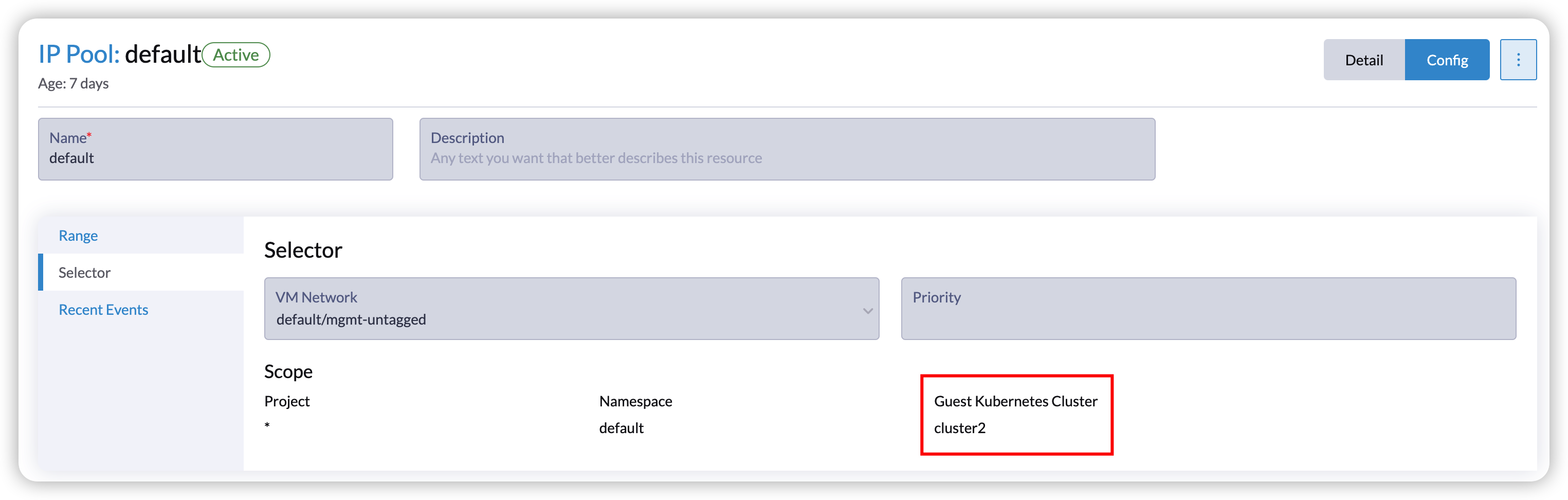
With Harvester v1.2.0, the new Harvester cloud provider offers enhanced load balancing capabilities for guest Kubernetes services. Specifically, it introduces the Harvester IP Pool feature, a built-in IP address management (IPAM) solution for the Harvester load balancer. It allows you to define an IP pool specific to a particular guest cluster by specifying the guest cluster name. For example, you can create an IP pool exclusively for the guest cluster named cluster2:
image

However, after upgrading, the feature is not automatically compatible with existing guest Kubernetes clusters, as they do not pass the correct cluster name to the Harvester cloud provider. Refer to issue 4232 for more details. Users can manually upgrade the Harvester cloud provider using Helm as a workaround and provide the correct cluster name after upgrading. However, this would result in a change in the load balancer IPs.

This article outlines a workaround that allows you to leverage the new IP pool feature while keeping the load balancer IPs unchanged.

Prerequisites

  • Download the Harvester kubeconfig file from the Harvester UI. If you have imported Harvester into Rancher, do not use the kubeconfig file from the Rancher UI. Refer to Access Harvester Cluster to get the desired one.

  • Download the kubeconfig file for the guest Kubernetes cluster you plan to upgrade. Refer to Accessing Clusters with kubectl from Your Workstation for instructions on how to download the kubeconfig file.

Steps to Keep Load Balancer IP

  1. Execute the following script before upgrading.

    curl -sfL https://raw.githubusercontent.com/harvester/harvesterhci.io/main/kb/2023-08-21/keepip.sh | sh -s before_upgrade <Harvester-kubeconfig-path> <guest-cluster-kubeconfig-path> <guest-cluster-name> <guest-cluster-nodes-namespace>
    • <Harvester-kubeconfig-path>: Path to the Harvester kubeconfig file.
    • <guest-cluster-kubeconfig-path>: Path to the kubeconfig file of your guest Kubernetes cluster.
    • <guest-cluster-name>: Name of your guest cluster.
    • <guest-cluster-nodes-namespace>: Namespace where the VMs of the guest cluster are located.

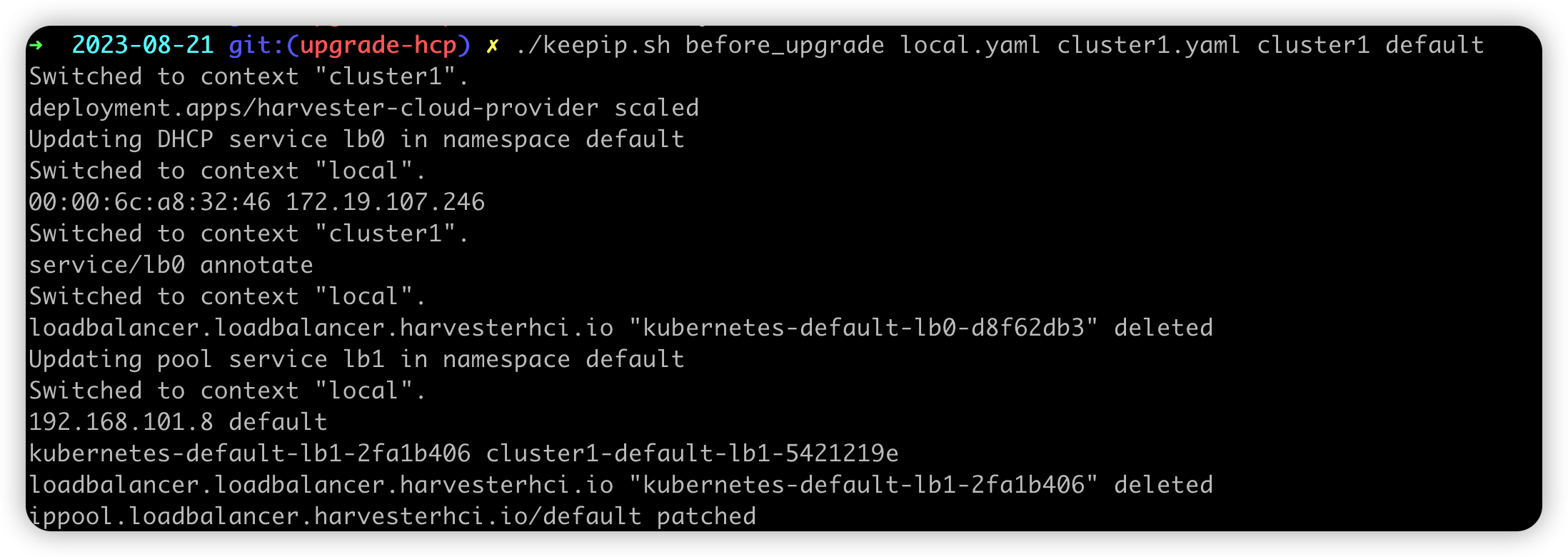
    The script will help users copy the DHCP information to the service annotation and modify the IP pool allocated history to make sure the IP is unchanged.
    image

    After executing the script, the load balancer service with DHCP mode will be annotated with the DHCP information. For example:

    apiVersion: v1
    kind: Service
    metadata:
    annotations:
    kube-vip.io/hwaddr: 00:00:6c:4f:18:68
    kube-vip.io/requestedIP: 172.19.105.215
    name: lb0
    namespace: default

    As for the load balancer service with pool mode, the IP pool allocated history will be modified as the new load balancer name. For example:

    apiVersion: loadbalancer.harvesterhci.io/v1beta1
    kind: IPPool
    metadata:
    name: default
    spec:
    ...
    status:
    allocatedHistory:
    192.168.100.2: default/cluster-name-default-lb1-ddc13071 # replace the new load balancer name
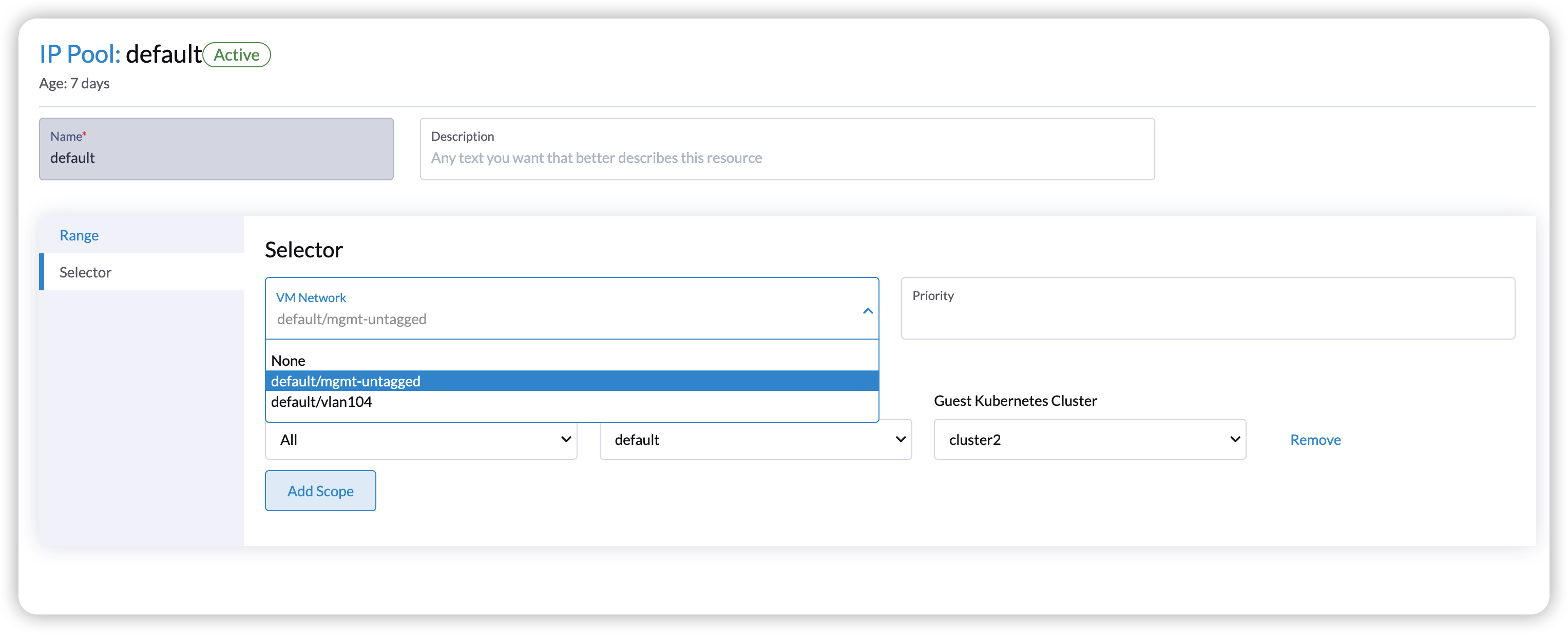
  2. Add network selector for the pool.

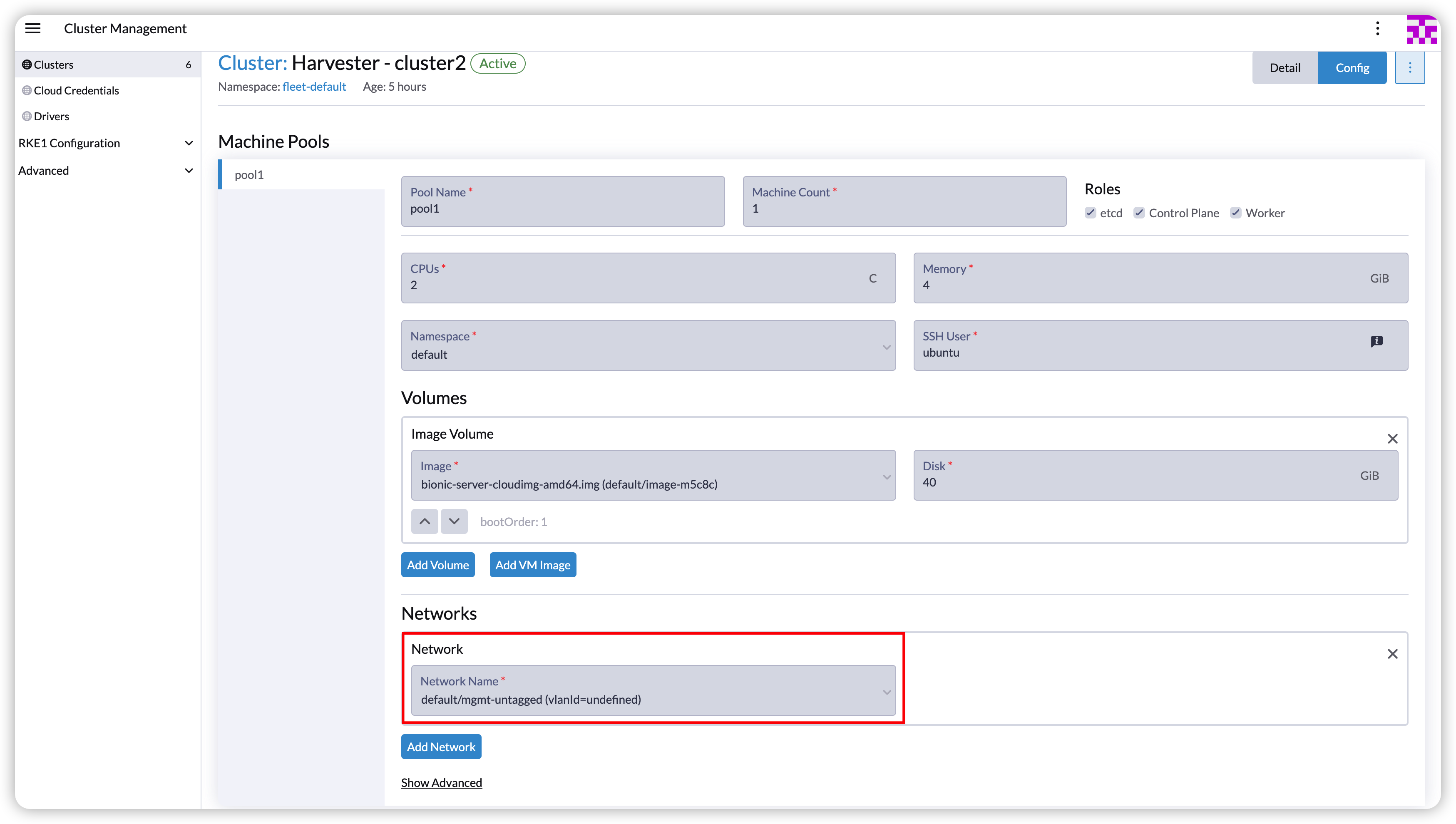
    For example, the following cluster is under the VM network default/mgmt-untagged. The network selector should be default/mgmt-untagged.

    image

    image

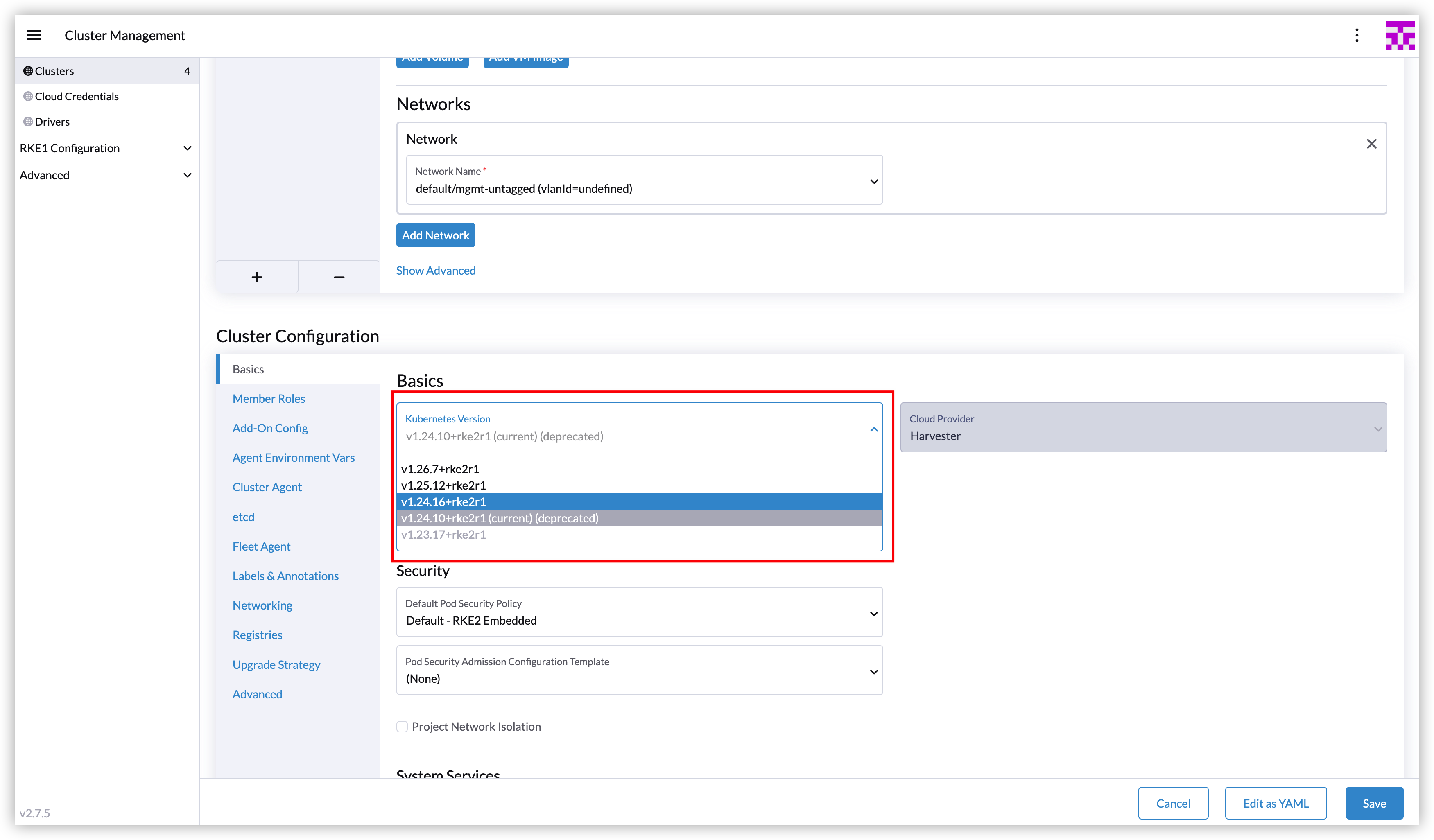
  3. Upgrade the RKE2 cluster in the Rancher UI and select the new version.
    image

  4. Execute the script after upgrading.

    curl -sfL https://raw.githubusercontent.com/harvester/harvesterhci.io/main/kb/2023-08-21/keepip.sh | sh -s after_upgrade <Harvester-kubeconfig-path> <guest-cluster-kubeconfig-path> <guest-cluster-name> <guest-cluster-nodes-namespace>

    image

    In this step, the script wraps the operations to upgrade the Harvester cloud provider to set the cluster name. After the Harvester cloud provider is running, the new Harvester load balancers will be created with the unchanged IPs.